
General.

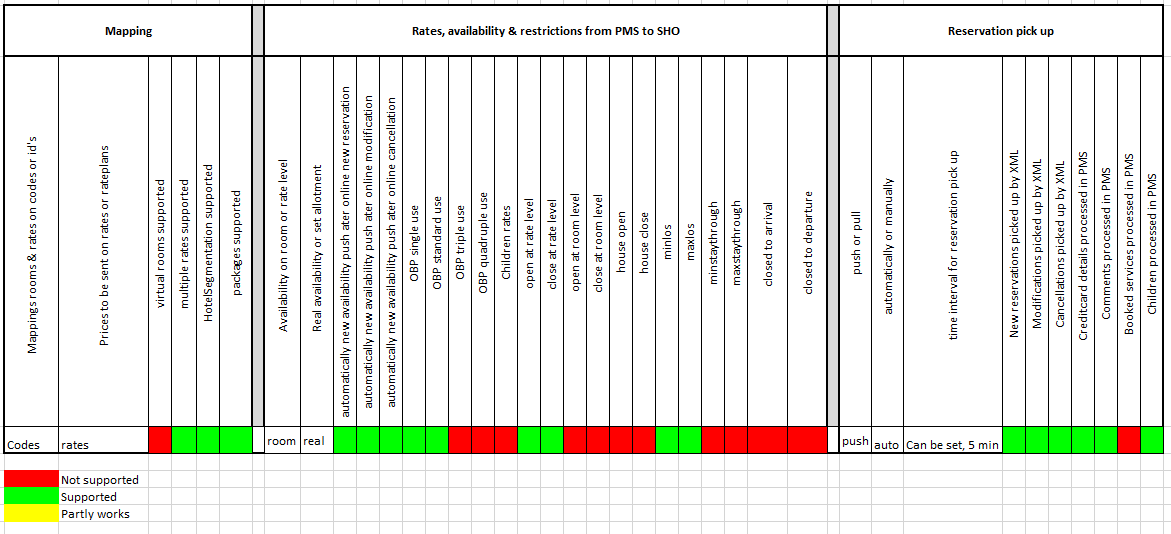
General details
Office address: Kleine-Gartmanplantsoen 21
Postal code: 1017 RP
City: Amsterdam
Country: Netherlands
Website: https://www.mewssystems.com/
PMS Help: https://help.mews.com/s/?language=en_US
Connection.
Mews x Smarthotel – Here’s What You Need to Know!
The hotelier needs to contact their Mews account manager to establish the connection between Mews and SmartHOTEL.
The following should be provided to Mews.
- Room codes
- Rate codes
Mews will provide SmartHOTEL the channel id. This channel id needs be loaded in the SmartHOTEL database under username & password. Also the API Key needs to be loaded. This key is the same for every hotel connected to Mews.
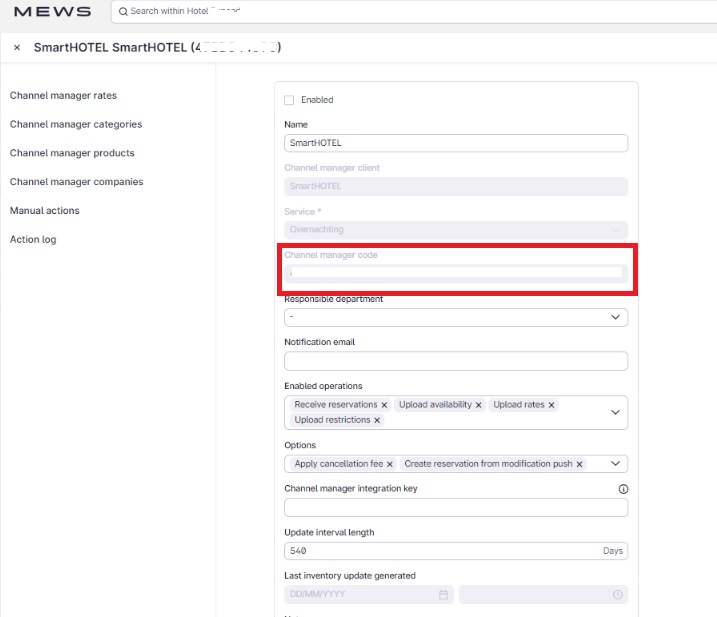
What are the different Channel Manager error emails?
Connect your channel manager
Mews x SmartCONNECT – Here’s What You Need to Know!
A step-by-step connection guide to assist you with your integration.
Step 1: Select SmartCONNECT as the Integration
On the Mews Marketplace, select SmartCONNECT as the integration. You can follow the official Mews guide to complete this step.
Step 2: Provide Your Mews Token
Share your Mews Token with your SmartCONNECT contact.
- Timeline: Provide this at least 7 days before the go-live date.
- Where to Find It: The token is located in your Mews integration settings for Smartconnect.
- Example Token: AE1A6B23F77F43AEB011EFEB8B9AB546-3C90852DF2EB30FB49EA5885A09D0
61
This token is crucial for maintaining the connection between SmartCONNECT and Mews.
Step 3: Enable Connection Settings
In SmartCONNECT's integration settings on Mews, ensure the following are enabled:
- Reservation Delivery
- Sending Inventory
- Rates and Restrictions
Step 4: Map Rooms and Rates
Map your rooms and rates:
- Match the space category codes and rate codes between Mews and SmartCONNECT.
⚠️ If the codes do not match, the connection will fail
Step 5: Map Channel Manager Products
If you have channel manager products, ensure they are mapped as follows:
- Match the product codes between SmartCONNECT and Mews.
- Note: Product mapping depends on the OTA, as not all OTAs support this feature.
Step 6: Provide Booking Site Names
Share the names of your booking sites with your consultant to map the IATA codes in SmartCONNECT.
IATA codes link reservations to travel agents in Mews.
Step 7: Push Data
Once the connection is ready:
- Go to Manual Actions.
- Select a date interval.
- Push the data towards SmartCONNECT.
The connection must be enabled for data to be successfully pushed.
Step 8: Quality Check
Perform a quality check to ensure data consistency:
- Compare data between the channel manager and Mews.
- Check one week’s data and a future date
How are extras handled?
Extras need to be mapped in the channel manager products in the Mews integration with the same shortname as the code in Smarthotel. The Smarthotel onboarding consultant will provide you this shortname. If you have a rule on PMS level which adds a product in Mews (for example, city tax) please make sure to make a counter rule to remove city tax from the travel agency Smartconnect. Otherwise the product will be duplicated in the reservation. Please make sure to set up the product correctly in Mews: do you want the product to be included in the total price Smarthotel is sending or would you like it on top of the price Smarthotel is sending? This needs to be set up in the product in Mews.
How are linked rates managed?
You are able to manage discounts and extra person calculation in Mews by creating relative rate adjustment in Mews on your BAR. If a rate includes a product, make sure to add the product to the rate so that the price including the product is sent to Smarthotel. In Smarthotel, we are also able to make rate calculations for you should you prefer just to send the BAR rate.
The best way to manage this is to define the occupants for the BAR rate. If you have a product attached to the rate, it will take in account the occupants in the rate calculation.
CONNECT information
Restrictions
1: "Open" - this removes all restrictions (arrival, departure and stay)
2: "Close" - this sets restrictions to Closed, always combined with one or more of the following values:
- 6: Closed to arrival
- 7: Closed to departure
- 8: Closed to stay
Mews HAS values to open arrival (3), departure (4) or stay (5), but those are explicitly not supported by Mews
CONNECT Channel ID's
To be able to send a reservation to Mews we must ensure that the Mews Channel ID for the OTA is set up in the Database.
When present, we will add this to the Json file for the reservation
"channel":{"code":1,"name":"Booking.com"}
If we have not added the code then the booking misses this information.
A full list of the Mews Constants can be found in Azure.
"OTA name", Mews channel ID // SmartHOTEL ID
- { "Booking.com", 1 }, // 2
- { "Hotels.nl", 153 }, // 3
- { "Hoteliers.com", 149 }, // 6
- { "Hotelspecials.nl", 162 }, // 11
- { "SpecialHotels.nl", 312 }, // 14
- { "Expedia/Hotels.com", 2 }, // 15
- { "HRS.de", 3 }, // 24
- { "Hotelbeds.com", 4 }, // 25
- { "Lastminute.com", 199 }, // 27
- { "MaxMind", 223 }, // 30
- { "Worldmeetings", 404 }, // 36
- { "Unister", 379 }, // 40
- { "Hotwire", 170 }, // 41
- { "Reconline", 281 }, // 45
Mews should provide you with the Channel ID and then it can be added to the database.
Useful Information
Mews uses a single end point to CONNECT which is linked to PMSConnect. If the hotel is in another cloud please ensure a reroute is done.
Credit card details
If the received credit card details from the booking site be incomplete (missing cardholder name or incorrect card number) then the information will be ignored and not sent to Mews. Connect will change the payment type to an "in hotel" booking