
General.


General details
Office address: Unit 1c, The Forum, Ballymoss Road, Sandyford
Postal code: DV18 VE83
City: Dublin 18
Country: Ireland
Telephone number: + 353 (0)1 2939906
Website: https://www.netaffinity.com
Extranet: varies per property
Switch.
An existing customer on channel
Please contact the hotel account manager via support department or by phone and request to turn on the SmartHOTEL module and you will receive the hotel id.
A new customer on channel
Hotel can contact the Net Affinity sales team to sign up and request the SmartHOTEL module with it.
Example switch email
| Subject: Connect hotel XXX to Netaffinity for SmartHOTEL module Dear Support team,Can you please activate the following property for the SmartHOTEl module?Property name:Property city: Property country: netaffinityProperty ID: |
You can also switch the Channel Manager directly in the Net Affinity extranet (Knowledge Article)


Credentials.
Who provides what
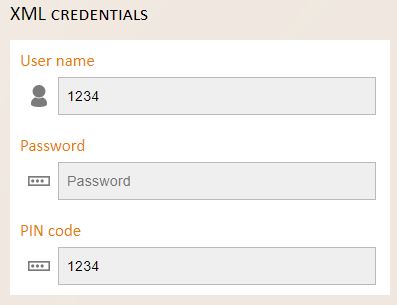
Hotels code is used as username and pin code. Which are provided by Net Affinity.
For the password please ask the SmartHOTEL team
Mapping.
When mapping for Net Affinity, it is important to check the configuration settings within the Net Affinity extranet to ensure they match the configuration of the channel manager.
Package configuration
The channel manager will send availability for each package on unit level.
Should any packages, except the base package, be pooling from central availability you can disable this by editing each package under availability screen and unticking the box 'Use Availability Bucket'

Conference and Group Rates
It is possible to set up Conference and Group rates in NetAffinity and these can then be mapped in SmartHOTEL for reservation delivery. If you are using these types of rates you will need to Pool them from central availability and also Float rates from a pre-defined rate.
Room type configuration
The room configuration in Net Affinity must match the occupancy settings in the channel manager.
Should any rooms accommodation children in the channel manager then you must ensure that the occupant setting in NetAffinity match, especially the Child Age Qualifying Code

Mapping
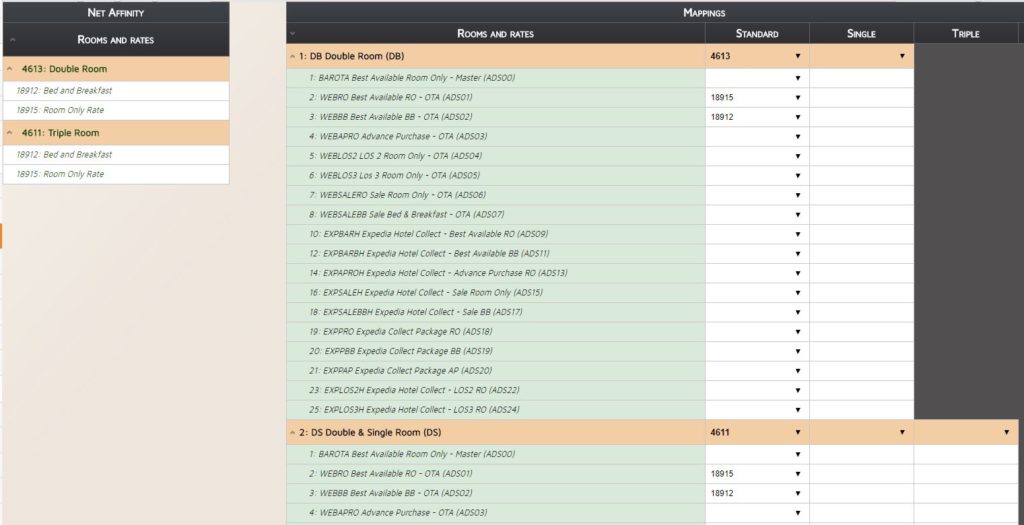
Mapping is always done in the Standard Column
Useful Info.
Occupancy Pricing
Setup will take highest price offered for max occupancy per that room and sets that up as a day price per room.
When double room has max occupancy set as 2 they will accept day rate as rate from NumberOfGuests=2 - 150.00
If quad room has max occupancy set to 4 they will accept NumberOfGuests=4 as day price per room - 250.00
<BaseByGuestAmt NumberOfGuests="1" AgeQualifyingCode="10" AmountAfterTax="10000" DecimalPlaces="2" />
<BaseByGuestAmt NumberOfGuests="2" AgeQualifyingCode="10" AmountAfterTax="15000" DecimalPlaces="2" />
<BaseByGuestAmt NumberOfGuests="3" AgeQualifyingCode="10" AmountAfterTax="20000" DecimalPlaces="2" />
<BaseByGuestAmt NumberOfGuests="4" AgeQualifyingCode="10" AmountAfterTax="25000" DecimalPlaces="2" />
In essence, the way the booking engine accepts pricing is per room, rather than per occupant. This is why upon integration we map a room rate at max. 2 adults, feed a separate single occupancy rate, and feed all other extra occupants as supplements.
https://support.netaffinity.com/knowledge/how-to-add-additional-occupant-supplements
Bookable until?
2 years in advance
How far in advance can data be sent?
2 years in advance
Reservations Pick up/ Push cycle?
Reservations are pushed to channel manager by Net Affinity
Credit Cards
Credit card details are not sent