
General.


Useful Information.
What details to provide to PMS partner
- If Siteminder is supported by Smarthotel, please ask the Smarthotel team to make the connection,
- If you have Siteminder independently, please request the ‘’Smarthotel B.v’’ connection.
- To make the connection with Smarthotel, you must provide us with the Property Code. This is generally a 4-digit numerical code found near your property name
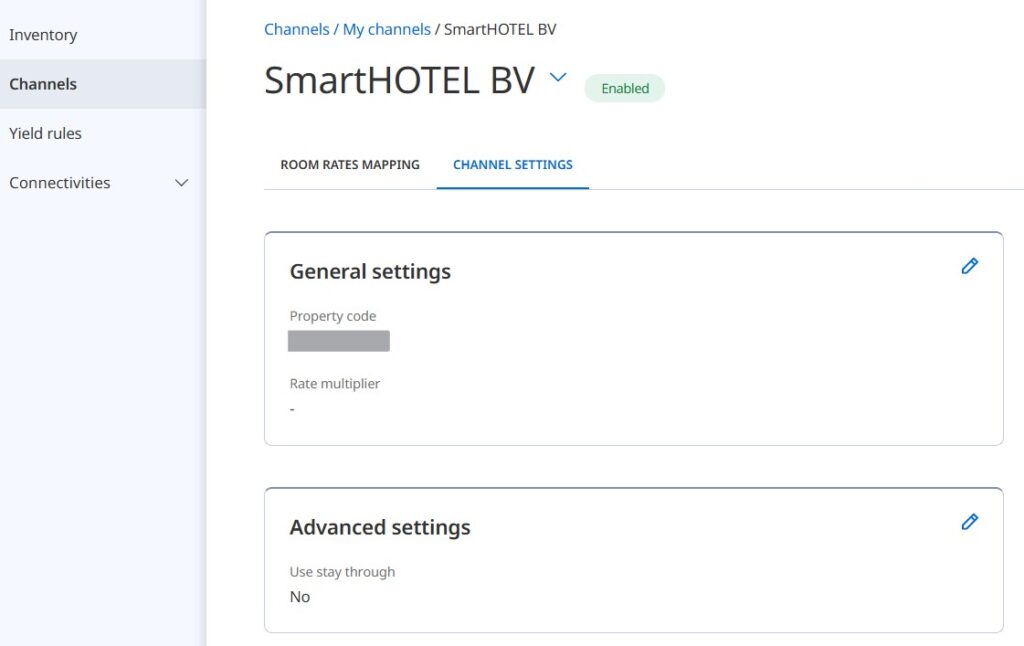
- In the general settings of your ‘’channel settings’’ in Siteminder, you need to enter the same property code under property code. This is used to maintain the XML connection
- In the advanced settings, please select ‘’Úse Stay Through’’ settings as NO . Smartconnect does not process the MinStayThrough Settings. We read MinLos/MaxLos settings
Useful information
- Siteminder does not have the ability to push messages on a date range, and therefore when ARI is pushed via Siteminder, Smarthotel receive a full 365 day ARI push. It is important to use ‘’Batch Processing’’ setting in Connect.
- Currently, Siteminder sends us ARI for 365 days however we have requested for them to push 546 days (this is still pending)